I
1000 Generated by WorldEditor
1 54 1 0 EGPI Islay Airport
Setting up the airport identity:
Open WED and select the airport. In the right hand search panel click on the airport name and the lower panel will show the details.
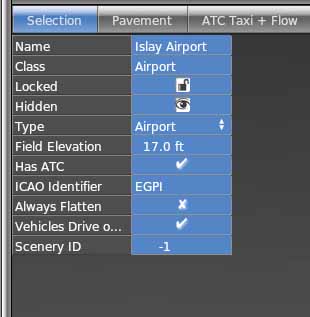
The airport data needs to contain the ICAO identifier and Ground Elevation. For the UK, vehicles drive on the left, so that is ticked here.
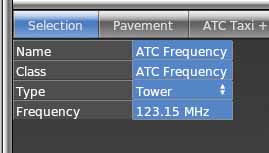
If there is a control tower and support, the ATC frequencies need to be added. Select the airport for edit and use the selection menu to select Airport / Create ATC frequency. For Islay, all contact is on radio frequency 123.150 as this is a very small airport.
Once the runways have been added, additional information like
approach, circuit and fuel availability can be added to a "ReadMe.txt" file in the airport folder.
Islay has
an OverHead Journey (OHJ) height of 2000 feet and a circuit height of 1000 feet.
Runways 26 and 31 have Left Hand circuits and runways 08 and 13
have Right Hand circuits. AvGas 100 LL is available during
daytime operations.
Top Tip: Lower case airport ID's will be excluded during load, so make sure you only use upper case letters and numbers. 4 character ID's are the normal format starting with a counrtry code. X-Plane will handle 6 character ID's.