It is a general protocol that if you produce a scenery library for X-Plane, that it is available from a single location on the internet and it is strictly "Not for Profit". Copyright of library objects must be observed, so permission to distribute library items must be obtained from the owner. Using library items in a free scenery is permitted as long as the user downloads the library from the approved location. That ensured consistence of content.
Details of library structure can be obtained from the official sources for X-Plane.
WorldEditor manual
Scenery Development Documents
Creating a Library
Scenery
objects, lines, facades, polygons and strings can be saved in a library
file. The texture files and scenery item files are best grouped
together for simplicity - within named folders. Some designers
prefer to group the library files in catagorised folders, but this is
not my preference. The files are referenced by WED from a Library.txt file which makes the library file access work.
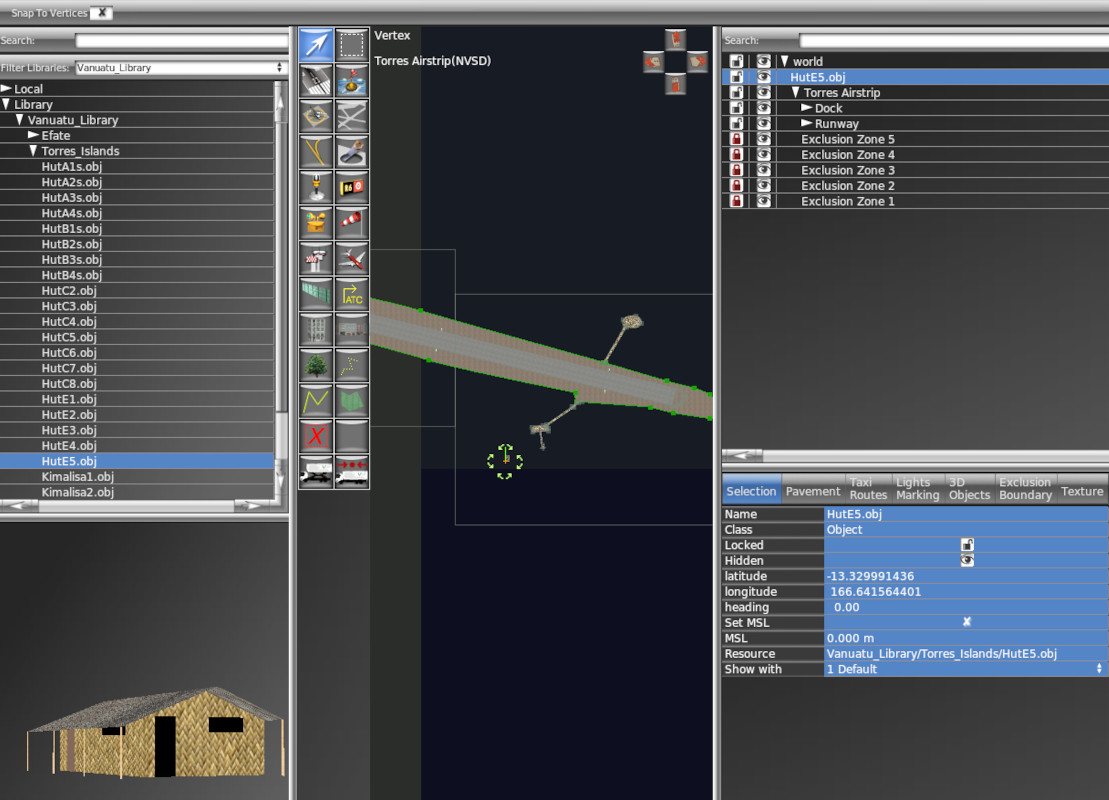
Here in WED, you can see a library called Vanuatu_Library with scenery items in folders called Efate and Torres_Islands. An object called HutE5.obj has been selected and placed in the scenery at Torres Airfield (NVSD) in Vanuatu.
The recource is found in Custom Scenery/Vanuatu_Library/Torres_Islands/HutE5.obj
The key thing that you need to make this happen is a correctly and accurately written Library.txt file
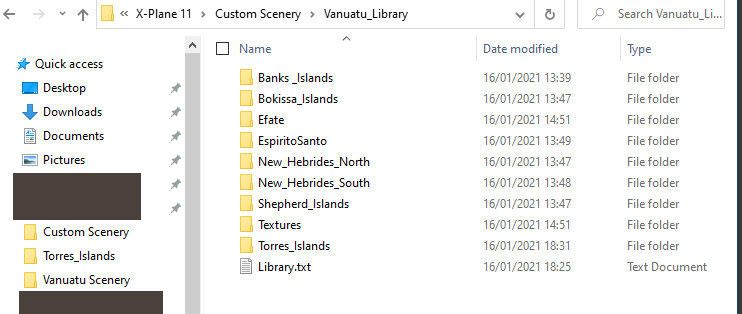
The scenery items are held in separate folders in this case, along with their specific texture files. Groups of scenery objects use the same scenery file to save on load time and the general scenery files are restricted to a maximum of 512 x 512 to keep the file size low.
The format of the Library.txt file a plain text file and is as follows:
A
800
LIBRARY
EXPORT <Virtual Path><Real Path>
The header allows X-Plane to identify this folder as a Library file, so the library file must be in the Custom Scenery folder at root level.
EXPORT gives the path to be displayed in the WED scenery Item details pane (Bottom Right) to show the designer where the item is stored, followed by the real path to allow the X-Plane compiler to load the scenery item relative to the Library text file.
for Hut5E.obj this would look like:
A
800
Library
(other EXPORT instructions not shown)
EXPORT Vanuatu_Library/Torres_Islands/HutE5.obj Torres_Islands/HutE5.obj
(other EXPORT instructions not shown)
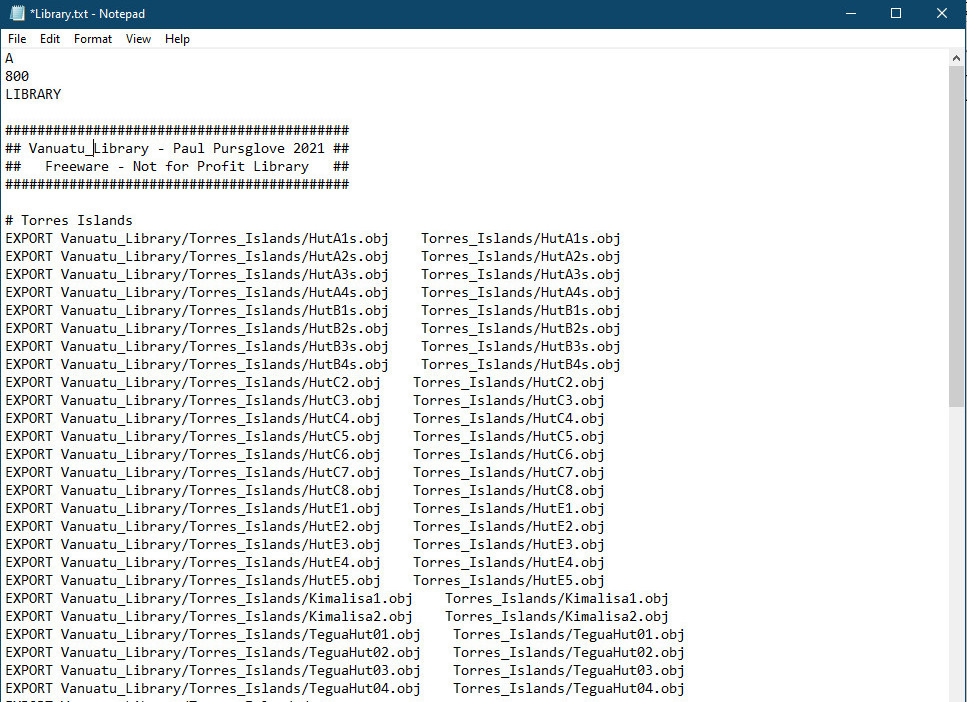
The
Library.txt file is read from the top to the bottom and instructs WED
how to display the library file items in its select pane (Top Left).
NOTE: The image of the hut will only display correctly if the TEXTURE location link in the .obj file is correctly made relative to the .obj file location and the texture file location. In this case:
I
800
OBJ
TEXTURE HutE.png
POINT_COUNTS 190 0 0 438
(etcetera.....)
The HutE.png file is in the same folder as the HutE5.obj file.
If the texture was in a serparate file called Textures, the link would be
TEXTURE ../Textures/HutE.png
Top Tips
Library named items should remain the same throughout the life of the Library. You will not get any thanks from the community if you produce a library for use, then edit out some items, or remove it from the Internet.
Library updates are generally to add extra items or re-texture existing items. In this case it is important to maintain the integrity of the library stock by keeping the exact library name and file layout.
.