Taxi signs are an essential part of most airports. Clearly, an airstrip that consists of a runway and an apron at one end will not need taxi signs, but most airfields do.
WED has a standard set of prepared signs that can be pasted up in the editor very quickly. They can also be set at small, medium and large - and be marked differently front and back. The signage elements are shown in the editor as:
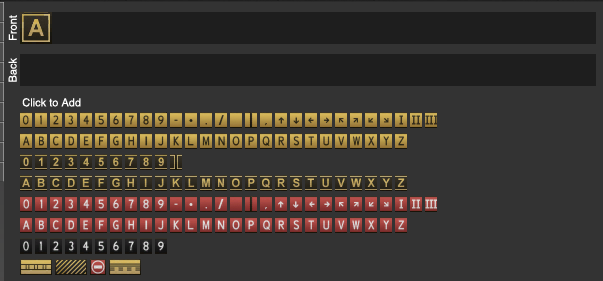
To create a sign, just click on the text elements in the matrix for the front (You will need to delete the default A if you do not need it). The back of the sign can also be marked with a set of symbols. Separators are also included to allow for multiple signs on one board.
The four signs at the bottom of the matrix are ILS critical boundary, taxiway ends, no entry and ILS hold.
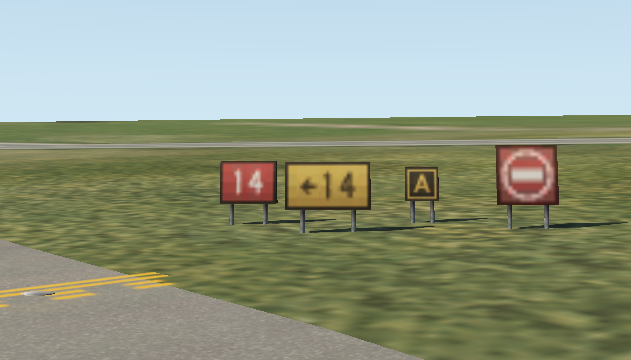
On the ground, the signs are displayed on the taxiway side on standard boards. Here, the sizes of small, medium and large are set to show the size range. The markup for these signs are shown on the XML as;
{@R}14 {@Y}{^l}14 {@B}A {@R}{no-entry}
The code for the colour is specified first in wavy brackets as upper case letters. Arrows are indicated in wavy brackets at ^r ^l ^u as lower case letters either before or after the text. The text of the sign must have no spaces - and is generally upper case letters or numbers with punctuation between;
{@Y}{^l} 26-07{^r} would show runway 26 turn left or runway 07 turn right.
Black signs are location signs. Yellow signs are direction signs. Red signs are runway hold compulsory signs.
The arrow on the WED position flag points in the direction of the front of the sign.
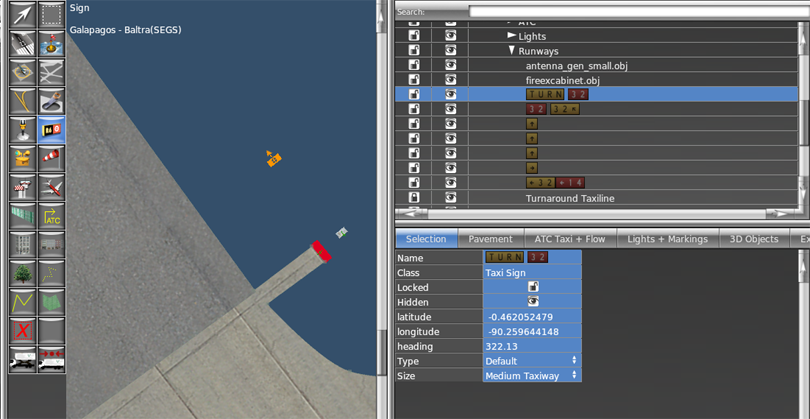
This image shows a small part of an airfield model with the sign for turning at the end of runway 32 placed just before the turning circle at the end of the runway. The sign has two sides with TURN (direction) on the front face and 32 (runway hold) on the back face.
Top Tip
Taxi an aircraft around the
airfield to check the signs and see what is wrong or missing.