If you are not confident with manually adjusting X-Plane files to maintain the flight simulator, The is a very good piece of application software written to do the basic maintainance for X-Plane 11.
Install in a separate folder to X-Plane and select the file location for the X-Plane setup you want to analyze or edit.
X-Plane 11 (or XP10 64 bit) Windows only Current version: 2.2.3 (May 9th 2020)

The application will put your scenery_packs.ini file in the correct order and flag up missing library files by airport, enabling you to keep your system up to date with the minimum effort. All you have to do is open the package and check your setup, then open X-Plane from the X-Organizer window. At a basic level it is really that simple.
If you open X-Plane from the XO window, your X-Plane scenery_packs.ini file will be updated to a fully functioning order.
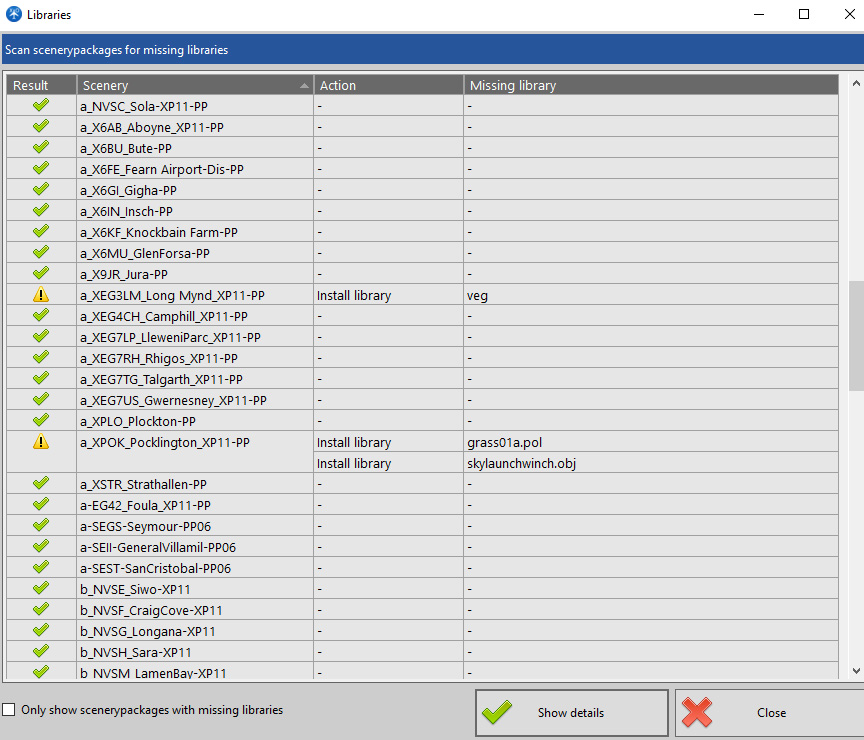
Missing library files can be flagged up to show you which Libraries need to be installed. In the above example, the veg library is missing and two internal local files are absent in the XPOK airport install.
Also, if you use the top menu to click on Scenery airports, then the right hand button to click on Analise duplicates, this will show you the priority of airports and which airport will load on the simulator.
XO will do much more than basic maintainance in the hands of an experienced user. It is a very sound backup tool worth having on your computer.
NOTE: The only down side of this software is that it cannot see the ReadMe files that airport designers add to instruct users on how to install software. When installing new airports you must check the read-me file to ensure the correct installation of extra files.
Currently, this is a Windows only package, but it uses the .NET software. It will work on some versions of Mac if the .net packages are installed. I have not so far been able to get it to run on Linux, but there must be a software fix out there.