AI aircraft will use airports randomly where a taxi route is not specified. To keep the traffic flow working, taxi routes can be pre-set in WED to allow for realistic aircraft movements.
For AI to work on at site, the airport needs to comply to a few basic rules of selection.
1. Needs an active paved runway of at least 2500' x 50' (larger for jet traffic)
2. Needs ATC frequency set for "Tower"
3. Needs ATC set in airport properties (has ATC)
4. Needs at least 1 ramp specified for aircraft size or larger.
Note: AI aircraft will land at the specified airport height MSL (or the mesh height if higher) Setting RFT (Runway Follows Terrain) will land AI aircraft at mesh height only.
AI routes are generated automatically for appropriately selected airports when AI is actively turned on. This means taxi routes are selected automatically and may not be logical for your airport. AI aircraft will be directed usually to the nearest taxiway that connects to the end of a runway. By specifying a simple loop taxiway close to the ramps, this flow can be controlled.
Task 1.
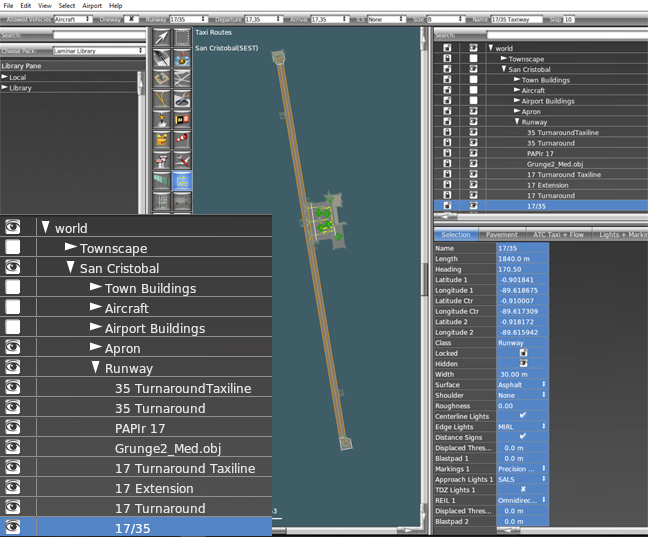
Unlock all ramps so that their positions will show and make all
scenery items invisible except for runways and taxiways.
If your scenery is grouped, this is an easy task.
If
the runway is only used for landing and takeoff, there is no need to
define a taxi route. In this case, the runway is a taxi route
prior to takeoff , so it needs to be defined.
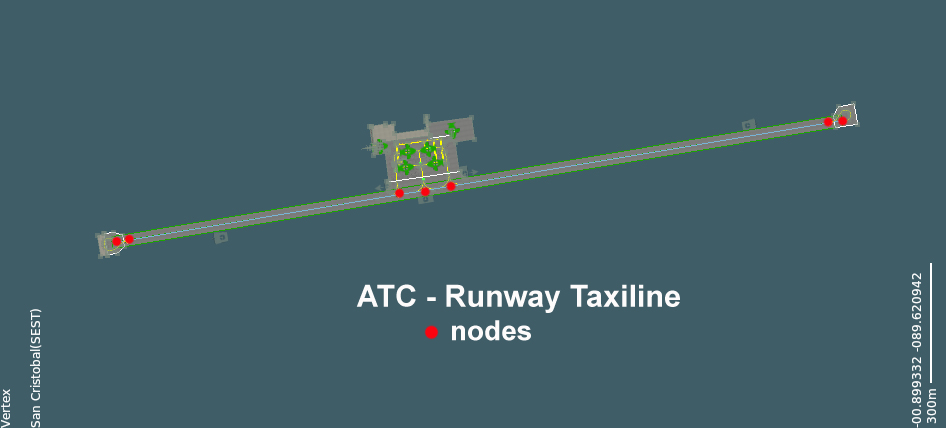
Using the ATC route tab, mark a Runway Taxiline from one end of the runway to the other, with nodes at each contact point where other taxi routes will be added in. The route should be set to Aircraft; Runway designation (in this case 17/35); two way; Depart 17,35; Arrive 17,35; ILS none; Aircraft A (Light Aircraft),B (Medium Haul Jets); Name 17/35 Taxiway:
Where the approach is only in one direction, set the Arrive to that runway approach. The same applies for departures. For runway taxiways that are not being used for takeoff or landing, specify Arrive and Depart as none. If appropriate make the routes unidirectional.
Additional taxiways can be placed at each end of the runway as one way turnarounds to control turn direction.
Taxiways can also be placed near to or onto ramps for entry and exit to each ramp position.

The Taxi Routes are positioned from the last node position (Runway) to the destination node (Ramp) and the node positions need to match. Above is the taxiway for ramp 1 inbound, which is a one way route for aircraft of size B. The outbound taxiway needs to be added from the ramp, along the central taxi line to the runway taxiway.
I shall also add a taxiway for Aircraft of size A to ramp 3 inbound and outbound. the other ramps will not have pre-set taxi routes, but will be available for start positions.

The final detail is to ensure that the ends of the Taxi Routes that converge with the runways are set as Hot Zones active for arrivals and departures for both directions of that runway (red lines). That will ensure that AI aircraft respect the hold for the runway.
If you are specifying ATC taxi routes, they need to be appropriate for the airport you are modelling. The taxi routes will be invisible in the scenery, but will direct any AI aircraft around the airfield. The taxi route lines do not need to be precise, but you do need to keep them close to the centre of the taxiways and runways. For small aircraft on large runways they can run down the centre of one side of the runway (usually the right side).
When the taxi routes are all added, restore the other scenery visually in the WED window.
Top Tips
Unless you have a single runway which has no taxiways, make all taxi routes one-way where possible. That will stop AI aircraft taxiing into each other.
Specify each AI flow as one direction only, per runway (ie. take off and landing in the same direction) to prevent collisions on the runway. Other AI routes can be added separately.
You do not need to specify taxiways down a runway if it is not used as a taxiway.
.