The great thing about X-Plane is the ability to add extra scenery and extra aircraft. These items can be designed using WED or Plane Maker, or added as freeware or payware installs. The way you go depends upon your skill level. The recommendation would be to start with freeware to get a feel for how this works, then progress to where you feel comfortable in the market.
Adding Aircraft - all new aircraft must be X-Plane (your version) compatible and unzipped to the base folder before you add the file to the Aircraft folder. You can group your individual aircraft folders into other folders like Airliners; General Aviation; Helicopters; Gliders; etc. You can also remove aircraft folders if you decide you do not need them.
Each aircraft should be backed up elseware on your computer with any activation codes or instructions.
Always consult the ReadMe files on an aircraft model before installing it. There may be improtant instructions to ensure that all works well.
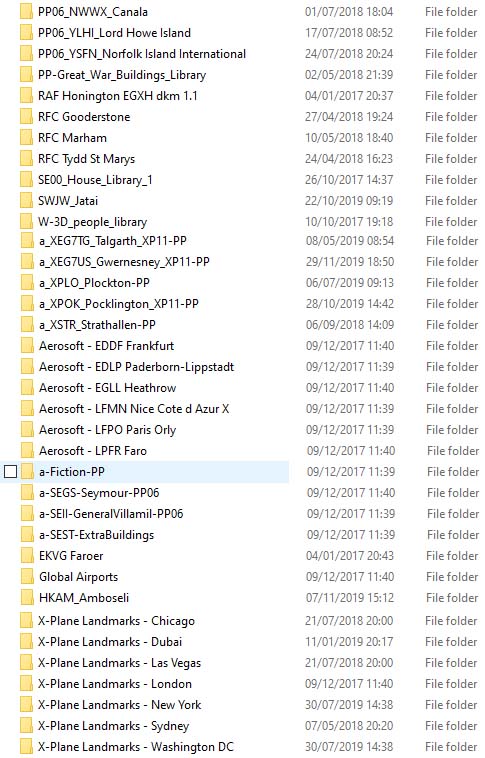
Adding Scenery - The Custom Scenery file is where you install scenery models (airports/ landmarks/etc.). It is important to understand that an airport scenery folder (once unzipped) must be placed in the Custom Scenery folder directly and must not be put into an additional folder. The name of the airport folder is not important as it is the airport apt.dat file within the folder that identifies the airport.
If the airport you are using has been downloaded from the X-Plane Gateway, it will function fully. However, if a scenery is obtained from other sources it may need 3rd party library files. Make sure that you read the information provided by the designer at source or in the scenery folder. Such airports will not load fully without the library files being installed in Custom Scenery.
Update your Library files at least twice a year. The designers of extended library files will add more objects and the old files may be insufficient to fully display a new airport scenery.
Settings - make sure that you have the "warn about missing scenery" box ticked in General settings.
Example Aircraft Folder |
Example Custom Scenery Folder |
 |
 |
|
A typical aircraft folder has aircraft files within it. Notice the folders for Laminar Research and vFlyAir Simulations which contain aircraft folders from those providers. Also notice the last document which is the user activation code for one of the aircrafts. X-Plane will not recognise text documents in this folder. |
Each scenery item is contained in its own folder. This example is a paste up, so it is not in strict alphabetical order. The sequence here is not important as the load order is given by a file called scenery_packs.ini at the end of this folder. |